The problem
If your goal is consistent short-form posting, the best editor is the one that keeps you shipping.
- Editing tiny speech mistakes can become “too much software”
- Long setup and exporting steps slow down momentum
- It’s easy to spend time polishing instead of clarifying the message
How SpeechCut helps
SpeechCut is intentionally focused on the talking-head loop.
- Edit by tapping words and phrases in the transcript
- Toggle cuts on/off to refine without fear
- Export a clean vertical short ready to post
Where each tool wins
This isn’t “better vs worse”-it’s about fit. SpeechCut prioritizes a fast mobile workflow for speech-driven shorts. Descript can be a better choice when your project is more than a short talking-head clip.
Pick SpeechCut if…
- You want to cut by words on your phone
- Your content is speech-based talking-head shorts
- You prefer “just enough control” over complexity
Pick Descript if…
- You’re editing longer, desktop-centric projects
- You want a broader toolset beyond short-form talking-head clips
- You’re okay with a heavier workflow to get more options
Realistic caveat: transcription can be imperfect. Review the lines you cut, especially names and numbers.
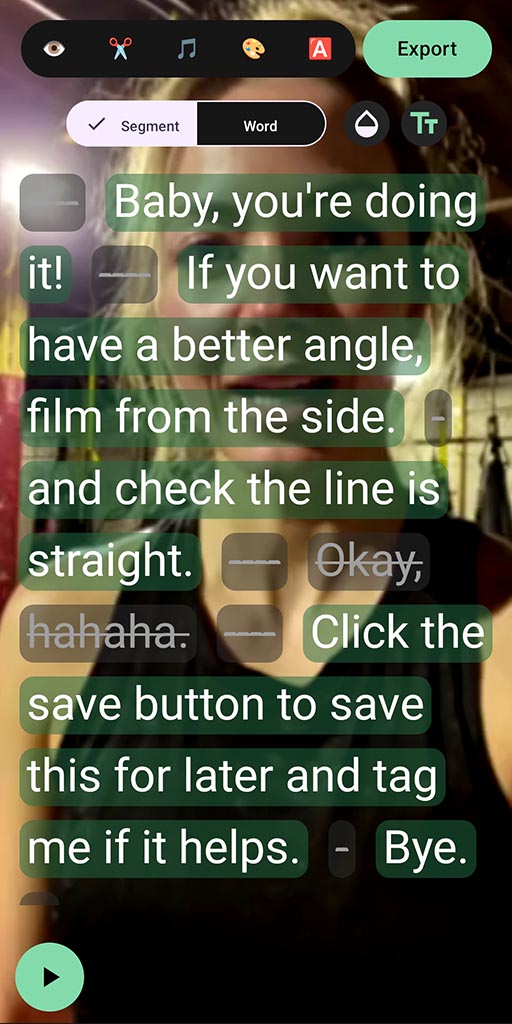
SpeechCut is designed for speech edits: cut mistakes and tangents by tapping words.
FAQ
Do both apps edit by transcript?
Both can use transcripts, but SpeechCut is built around a transcript-first mobile workflow for talking-head shorts.
Does SpeechCut support long-form editing?
SpeechCut is designed for speech-based short videos, not full movies or heavy multi-track timelines.
What platforms does SpeechCut support?
Android is available now. iOS is planned (waitlist).
More comparisons
Explore other alternatives based on your workflow.
Edit your next clip by editing the words
Talk naturally once, then clean it up fast.