The problem
Short-form is a volume game. You either need a fast edit loop-or a strong automation loop.
- Manual editing can stall your posting cadence
- Fully automated clips can miss context or tone
- You still need a clean message, not just “a clip”
How SpeechCut helps
SpeechCut makes the edit itself faster by turning it into text decisions.
- Remove mistakes, tangents, and filler by tapping words
- Toggle cuts on/off to refine quickly
- Export a vertical short ready for Reels, TikTok, Shorts, or LinkedIn
When each approach is a better fit
If you want to shape your message, transcript editing is direct. If you want lots of clips from a long video with minimal manual work, automation can win.
Pick SpeechCut if…
- You record purpose-made talking-head clips
- Your edits are about clarity (cut what doesn’t earn attention)
- You want a mobile-first workflow
Pick Opus Clip if…
- You have long videos and want many clips fast
- You’re okay with reviewing and selecting from suggestions
- You prioritize volume over hands-on message shaping
Realistic caveat: transcript-based editing depends on transcription quality. A quick review helps, especially with noise or accents.
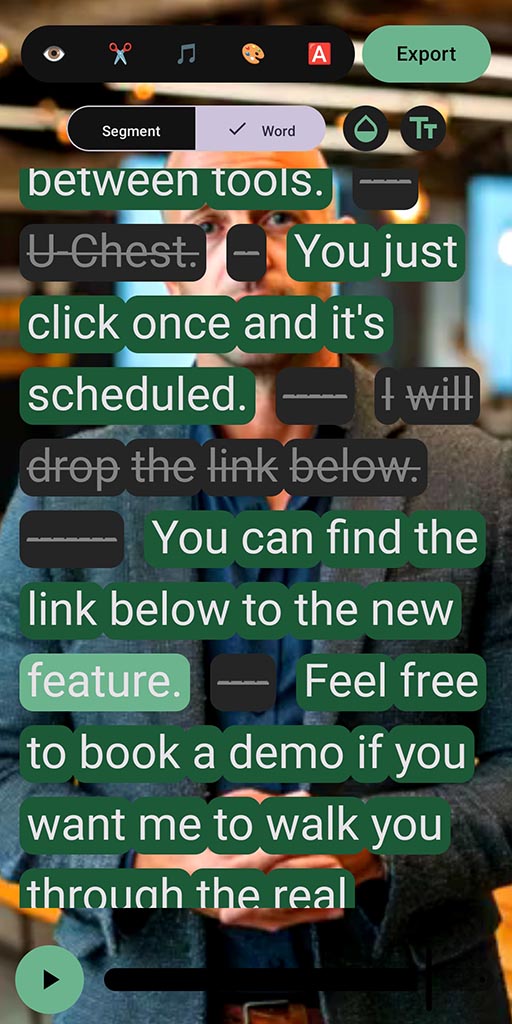
SpeechCut keeps you in control: cut by words, not by wrestling a timeline.
FAQ
Is SpeechCut an “auto clip generator”?
No. SpeechCut is designed for control: you choose what stays by tapping words and phrases in the transcript.
What if I want to repurpose a long webinar?
Automation tools can be a strong fit there. SpeechCut fits best when you’re producing speech-led shorts (or when you want to refine a specific clip by message).
What platforms does SpeechCut support?
Android is available now. iOS is planned (waitlist).
More comparisons
Compare against other editing approaches.
Cut to what matters
If your content is speech-based, transcript editing keeps you moving.