
The remove filler words feature helps you clean up “um”, “uh”, restarts, and hesitations by tapping words and phrases in the transcript.
It’s built for a natural result: remove what slows the sentence, keep what sounds human — and toggle lines back if you cut too much.
- Target filler in the transcript (no waveform hunting)
- Keep delivery natural: remove clutter, not personality
- Export a tighter talking-head short for social
A practical way to remove filler
Don’t aim for “robot clean.” Aim for clarity. Remove the filler that slows the sentence, keep the moments that make you sound human.
Scan for repeats
Cut “I think… I think…” restarts and duplicated lines.
Target filler clusters
Remove “um”, “uh”, and long “so…” lead-ins where they don’t add meaning.
Listen once
Do a quick pass to ensure cuts sound natural.
Export & post
Ship the clip while the idea is still fresh.
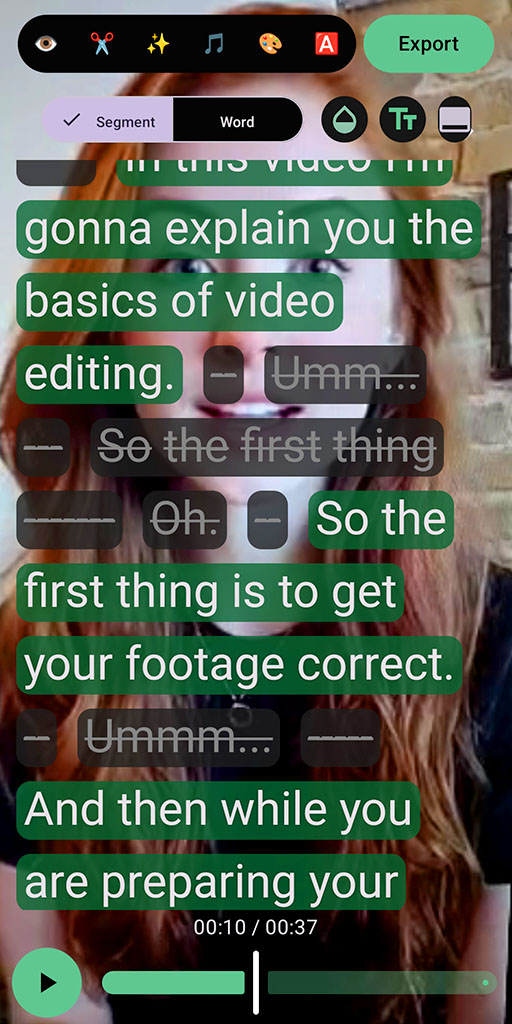
Tip: cut filler that slows the point, not your personality.
Proof (what to expect)
For most talking-head shorts, removing a few seconds of filler is the difference between “scroll past” and “keep watching.”
Tighter pacing
Fewer dead moments between ideas.
Clearer message
Less “warming up” before the point.
More confidence
You can record once and refine after.
Realistic caveat: removing too much can make you sound rushed. Use this feature to remove clutter, not to erase every natural pause.
FAQ
Is filler-word removal automatic?
SpeechCut is built for control: you target words and phrases in the transcript and decide what stays.
Can I bring words back?
Yes - words and phrases are toggleable, so undoing is quick.
Will it remove every “um” perfectly?
Transcription can miss things, especially with noise or overlapping audio. A quick review is worth it.
What platforms does SpeechCut support?
Android is available now. iOS is planned (waitlist).
Related features
If you’re cleaning up speech, these help too.
Talk naturally once, then clean it up fast
Cut filler and keep what matters - without getting stuck in a timeline.