
The custom captions feature helps you make your clips easier to watch on a phone with clear, high-contrast captions that match your style.
Because captions are tied to the transcript, they stay in sync as you edit by tapping words.
- Create captions from your transcript + word timings
- Captions stay aligned as you cut lines in the transcript
- Export a speech-first short that’s easy to watch with sound off
What “custom captions” means in practice
Captions should be readable at a glance. The goal is simple: clear text, good contrast, and timing that matches your speech.
Pick a readable style
High contrast, clear size, clean placement.
Edit the words
Cut mistakes and tangents by tapping phrases.
Captions stay aligned
Caption timing stays in sync as you change the edit.
Export & post
Ship a vertical clip with readable captions.
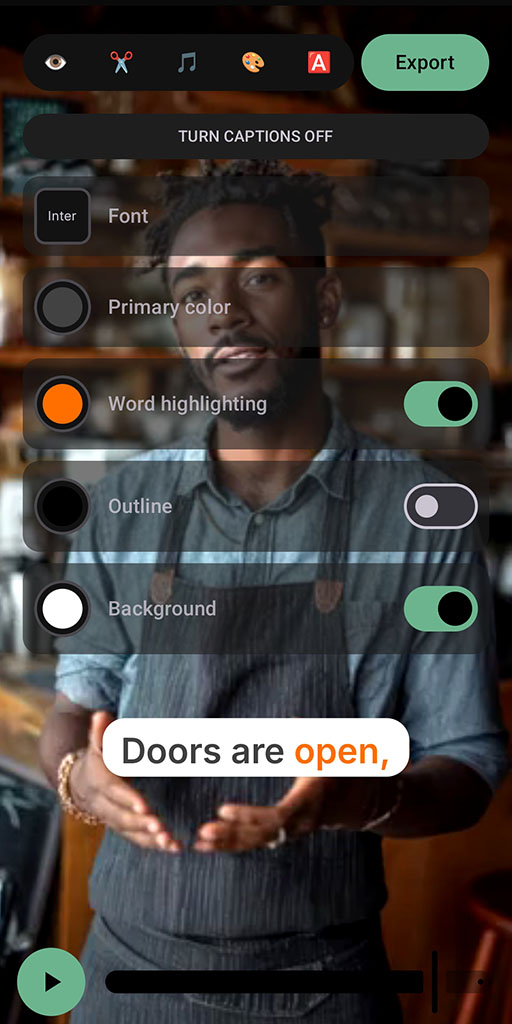
Tip: captions should be readable on a small screen at arm’s length.
Proof (what to expect)
Good captions don’t just “add text.” They help the viewer follow the idea without effort.
More comprehension
People can follow even with sound off.
More consistency
A recognizable caption style across your clips.
Less rework
Captions stay in sync while you refine the edit.
Realistic caveat: captions are based on transcription. If the transcript has errors, fix key words before exporting - especially names and numbers.
FAQ
Do captions stay in sync if I cut lines?
Yes - captions stay aligned as you edit the transcript.
Can I make captions more readable?
That’s the point. Use a high-contrast, clean style that works on mobile screens.
Are captions always perfectly accurate?
Not always. Transcription can be imperfect with noise or accents, so review key words before posting.
What platforms does SpeechCut support?
Android is available now. iOS is planned (waitlist).
Make your clips easier to watch
Add readable captions, keep them in sync as you edit, and post faster.